# RouterOS Assistant — User Manual
This manual covers only features that have been **live-tested and
confirmed against real MikroTik hardware** (milestones marked ✅ in
`README.md`). Features not yet fully verified (e.g. parts of WLAN setup,
the newer wifiwave2 driver) are marked as such here, or documented in
`HANDOFF.md`.
**Note on illustrations:** this manual is maintained by an AI assistant
with no access to screen/UI automation for native macOS apps — real
screenshots of the app can't be produced. Mermaid diagrams (pre-rendered
as images under `Manual-assets/`, also readable as Mermaid source from
the same file) are used for visualization instead. Anyone wanting to add
real screenshots: drop images under `Manual-assets/` and embed them with
``.
All field names, help texts and warnings in Chapter 5 (Expert) are
**taken verbatim from the app's source code** (`RouterOSSchemaCatalog.swift`,
extracted automatically) — not paraphrased, so they match exactly what
the app actually shows.
---
## Table of Contents
0. [Overview & Architecture](#0-overview--architecture)
1. [Connect](#1-connect)
2. [Setup (Wizard)](#2-setup-wizard)
3. [Topology](#3-topology)
4. [LAN Scanner](#4-lan-scanner)
5. [Expert](#5-expert)
6. [Backups](#6-backups)
7. [Settings](#7-settings)
---
## 0. Overview & Architecture
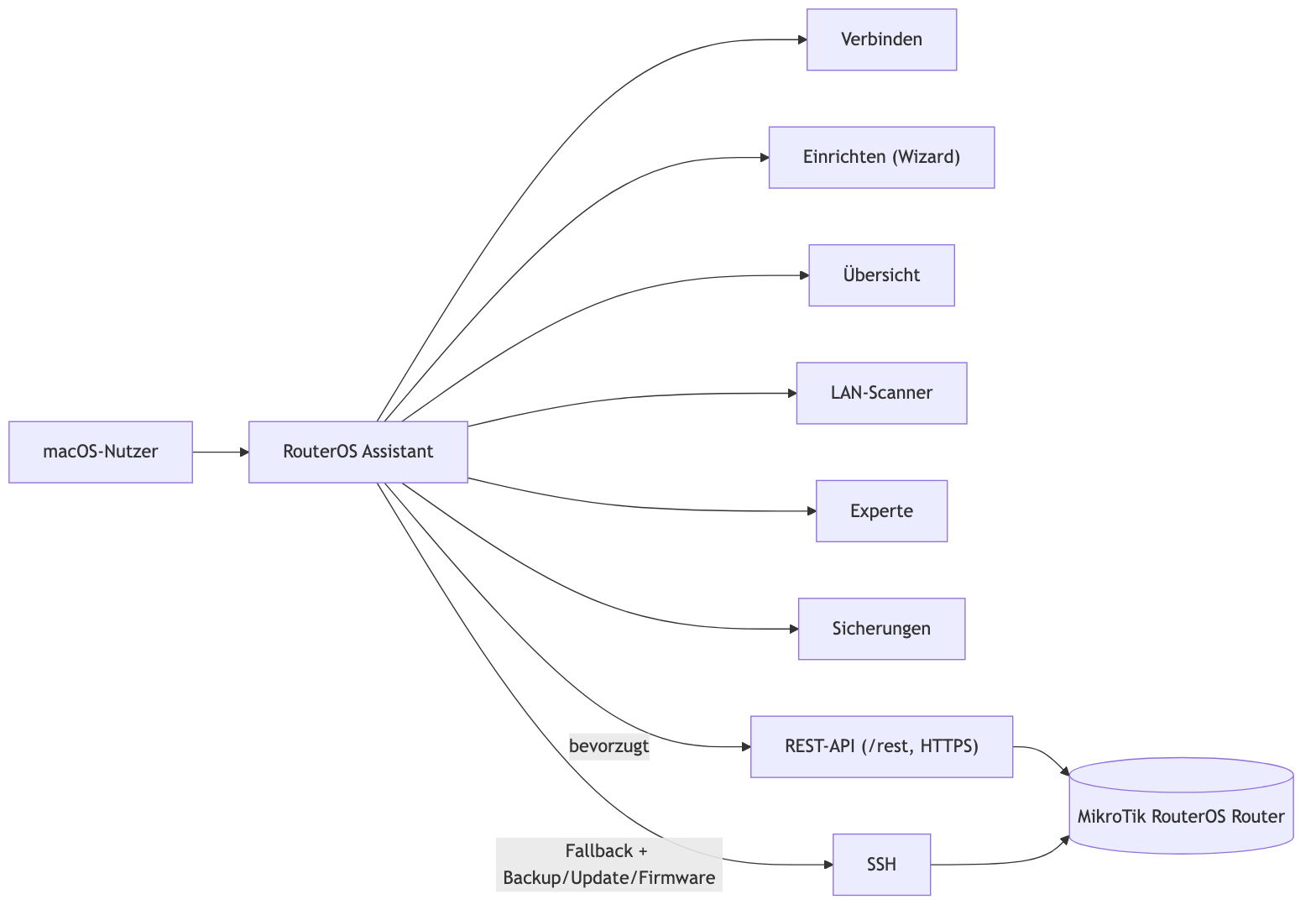
RouterOS Assistant is a native macOS app (SwiftUI) that sets up and
manages MikroTik RouterOS routers through a guided wizard and six tabs:
**Connect**, **Setup**, **Topology**, **LAN Scanner**, **Expert**,
**Backups**.
The app talks to the router over two transport paths:
- **REST API** (`/rest/...`, HTTPS) — preferred, since RouterOS 7.1.
- **SSH** — fallback, and mandatory for features only available via the
command line (automatic backup before changes, firmware update,
software update check).
The app decides which path to use automatically — no configuration
needed.
A DE/EN toggle button (flag icon) in the toolbar switches the app's
language (persists across restarts). All six tabs are fully translated
(static UI text, buttons, tooltips). Values that come directly from the
router (error messages, CLI command lines, live logs) stay untranslated.
---
## 1. Connect
### Connecting
| Field | Help text (verbatim from the app) |
|---|---|
| Host | "Your router's address on the network. MikroTik's factory default is usually 192.168.88.1." |
| Username | "Your router's admin username. The factory default is usually 'admin'." |
| Password | "The password for this user. Often empty on an unmodified factory setup." |
| Remember password | "Stores the password encrypted in the macOS Keychain, so you don't have to type it in every time." |
An eye icon next to the password field reveals the input for checking.
### Trust Verification (Trust-on-First-Use)
The first time you connect to a router, the app shows a dialog — "The
router presented an unknown certificate" (REST) or "...an unknown SSH
key" (SSH) — to confirm once via "Trust and connect" (or "Cancel"). This
protects against a swapped/spoofed device answering at the same IP
address.
On a REST connection, **both** dialogs can appear in sequence: the app
also checks the SSH host key once in the background, because backup,
update check, and firmware update always need SSH — regardless of which
transport is used for actual configuration.

### After Connecting
- Detail page with complete Routerboard info (model, revision, serial
number, firmware type/version).
- **Software update check**: "Checks with MikroTik whether a newer
RouterOS version is available. Needs internet access on the router."
"Check now" / "Install update" buttons.
- **Firmware update**: updates the Routerboard bootloader firmware
separately. "Needed for the newly written firmware to become active —
doesn't happen automatically" → "Reboot now" button.
- Quick-backup button right in the tab: "Backs up the current router
configuration — useful right after connecting, before you change
anything in the Setup tab."
- "Disconnect": "Ends the connection to the router. Credentials are kept
(if remembered)."
### Known Routers
After every successful connection, the app remembers host, username,
and (if reported by the router) serial number. Two different routers
sharing the same host+username (e.g. both still on MikroTik's factory
address `192.168.88.1`/`admin`) therefore stay separate entries,
recognizable by the "SN: …" line; the remembered password is stored per
device, separately, in the macOS Keychain. The display name defaults to
the hardware name the first time (e.g. "hEX"), but can be changed anytime
via "Edit" — which also has a free-text location field (e.g. "Basement,
server rack") to tell multiple routers apart. Clicking an entry fills
host/username/password into the form without connecting immediately. The
list scrolls in place past about 4 entries.
### Live Traffic Indicator
The dot in front of each interface in the device overview is gray (no
link), green (link, but no traffic), or pulsing green (actively
transferring data right now).
### Automatic Reconnection
If the connection drops during an active session (router reboot,
cable/Wi-Fi briefly interrupted), the app tries to restore it on its
own — a heartbeat check every 10 seconds, and on failure a new connect
attempt every 5 seconds (REST first, then SSH), indefinitely until it
succeeds or "Disconnect" is clicked. An orange notice with a spinner
appears in the Connect tab meanwhile, including an attempt counter and a
countdown to the next try. Other tabs stay usable during a brief outage
instead of immediately switching to "Not connected".
---
## 2. Setup (Wizard)
A guided step-by-step assistant for basic configuration. A mode switch
at the start chooses between:
- **Simple**: "Basic setup: internet connection (WAN), one home network
(LAN) with DHCP, Wi-Fi, and a permanently enabled basic firewall. No
VLANs, no multiple separate networks, no network isolation — can be
added later anytime via Expert mode."
- **Expert**: "Full access: multiple LAN interfaces each with its own
DHCP server, VLANs, network isolation between networks, and every
firewall option."

### WAN (Internet Connection)
| Field | Help text |
|---|---|
| Port | "The network port your router uses to connect to the internet (e.g. the cable to your modem or wall socket)." |
| Connection type | "How the router logs in with your internet provider. 'Automatic (DHCP)' fits most cable/fiber connections." |
| Automatic (DHCP) | "The router gets its internet address automatically from your provider. The right choice for most cable/fiber connections." |
| Static IP address | "The fixed IP address your provider assigned you, including the subnet mask (the number after the /, e.g. /24)." |
| Gateway | "The address of the next device towards the internet — usually found in your provider's documentation." |
| PPPoE username | "Credentials from your internet provider for dial-in (e.g. for DSL connections)." |
| PPPoE password | "The password that belongs to the username, from your internet provider." |
### LAN (One or More Networks)
| Field | Help text |
|---|---|
| Port | "The internal network port your devices connect to (your local network, LAN)." |
| Router address | "The address at which the router itself is reachable on this network." |
| Network range | "The complete address range of this network (e.g. /24 allows up to 254 devices)." |
| DHCP from | "The address from which the router automatically assigns addresses to devices on this network." |
| DHCP to | "The address up to which the router automatically assigns addresses to devices on this network." |
| Lease time | "How long a device keeps its assigned address before it must be renewed." |
| DNS server | "Which server translates internet addresses into names for devices on this network (e.g. www.google.com). Usually the router itself." |
| Network isolation | "Prevents traffic between this and all other configured LAN/VLAN networks. Internet access is preserved. Implemented in the Firewall step." |
In Expert mode, multiple physical ports/interfaces can be set up as
separate networks (the "Add another LAN network" button), each with its
own address range and optional network isolation. Address fields start
empty — the field itself shows an example format that disappears while
typing.
**Port conflict check**: if the user picks a port that's already
configured differently, a warning appears with the reason and a "Free up
this port now…" option — "Pick a different, free port above — or free
this one up now. Its existing configuration will be removed." This isn't
actually carried out until "Apply now" at the end of the wizard — until
then it can be undone by picking a different port above.
### VLAN (Optional)
"A VLAN is an additional network with its own address range — e.g. for
guests or smart devices. Whether it's isolated from the main network is
set below, per network, via 'Isolate from other networks'. If you're not
sure whether you need this, just skip this step."
| Field | Help text |
|---|---|
| Name | "A name for your own reference, e.g. 'Guests' or 'Smart Home'." |
| VLAN ID | "A unique number to technically distinguish this network. Only needs to be unique within your router." |
| Base port | "The physical port this additional network is built on." |
| Router address | "The router's address within this additional network." |
| Network range | "The complete address range of this additional network." |
| DHCP from/to | "The address range from/to which devices on this network automatically get an address." |
### Wi-Fi (Only If Detected)
"No Wi-Fi was detected on this device. This step will be skipped." —
otherwise: "Turns on Wi-Fi on this radio and sets the network name and
password."
| Field | Help text |
|---|---|
| Network name (SSID) | "The name devices see in their Wi-Fi list and use to connect." |
| Password | "The Wi-Fi password (WPA2). Must be at least 8 characters long." |
### Basic Firewall Protection
"Protects your router and your devices from unsolicited access from the
internet, and lets your devices access the internet (NAT)." Always
active in Simple mode; selectable in Expert mode: "Sets up standard
protection: internet sharing (NAT) for your home network, and blocks
unsolicited access from the internet to your router and your devices.
Existing, self-configured rules are kept — the new rules are placed
first."
If the router already has its own firewall rules, the app additionally
warns: "Your router already has its own firewall rules. The new rules
will be placed first, existing ones are kept — still check the order
afterwards, e.g. via Winbox or '/ip firewall filter print'."
### Review / Apply
"A backup of the current configuration is created automatically before
applying (Backups tab). There's no guaranteed automatic rollback on a
connection loss — if there's a problem, use the backup in the Backups
tab, or restore the router locally (Ethernet/console)." Every single
command is shown before it runs.
The wizard can be run again on an already-configured router (e.g. to add
another network) — existing settings aren't duplicated or damaged in the
process. "Cancel" is available anytime via the button top right (in both
Simple and Expert mode): "All values entered in this wizard will be
lost" — a confirmation dialog, resets the wizard to the first step.
---
## 3. Topology
A graphical diagram of the router's complete current state — five
columns, with real connection lines (no guessing, derived from actual
RouterOS reference fields):
| Column | RouterOS area |
|---|---|
| Interfaces | Physical ports, bridges, VLANs, WireGuard, … |
| IP Addresses | Assignments from `/ip address` |
| Pools & DHCP | Address pools, DHCP servers/networks/clients |
| Routes | `/ip route` |
| Firewall & NAT | Filter/NAT rules, address lists |
Not shown in the diagram (but reachable via the Expert tab): VPN: PPP
users/profiles, Wi-Fi security profiles, Queues/bandwidth control, System
(name/clock/scheduler/scripts/user accounts), Tools (Netwatch/email),
Firewall: Mangle and Raw rules.
### Connection Types (Line Colors)
| Type | Meaning (verbatim from the app) |
|---|---|
| VLAN → base interface | "The VLAN interface builds on the base interface — it's its own network, separated by VLAN tag, on the same physical port." |
| Bridge port | "This physical port is a member of this bridge — devices on this port behave as if they were on the same cable as every other bridge port." |
| WireGuard peer | "This WireGuard VPN tunnel runs over this interface." |
| Interface → IP address | "This IP address is assigned to this interface." |
| DHCP / Pool | "This DHCP component (server, pool, or network options) belongs to this interface or address." |
| Route → interface | "This route goes via this interface or gateway." |
| Firewall/NAT → interface | "This firewall or NAT rule refers to this interface (as input or output)." |
| Address list → rule | "This rule checks whether an address is on this address list." |
### Interaction
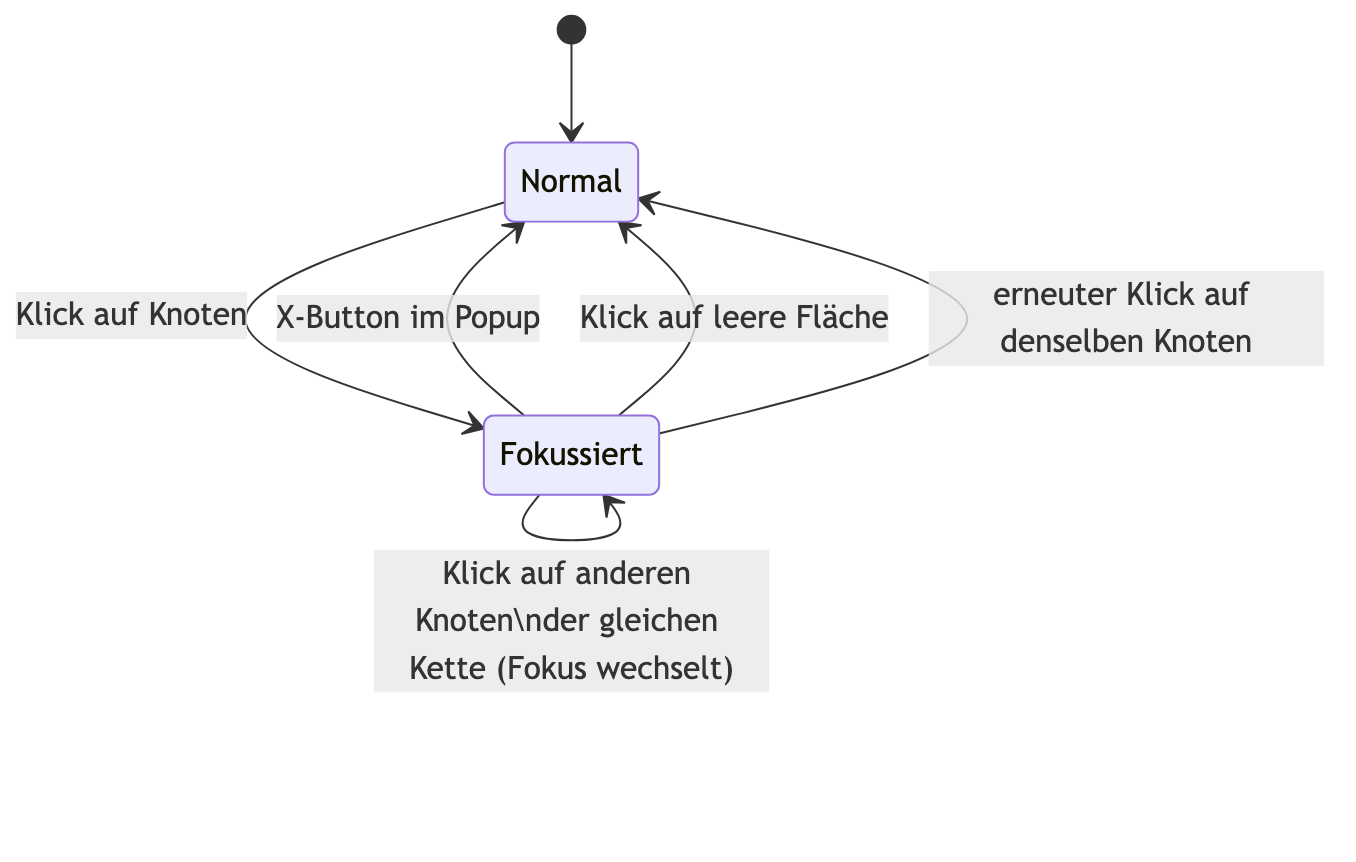
- **Hovering** a node highlights its connections; **clicking** makes the
highlight permanent and simultaneously opens **Focus Mode**.
- **Clicking a connection line** shows an understandable explanation on
the right of what that connection means, plus a jump to both connected
elements.
- Zoom buttons (−/100%/+) for the diagram size; cards can be freely
dragged (connection lines follow live), "Reset" in the toolbar restores
the original column arrangement.
- Connection lines animate in flow direction ("from → to").
- Refreshes automatically whenever you switch to the tab.
### Focus Mode
Clicking a node opens a floating popup with the **complete connected
chain** (every directly and indirectly connected element, the transitive
closure) in the same column layout as above, neatly re-arranged;
everything else in the main diagram dims. Close it via the X button at
the top of the popup, by clicking the empty area next to it, or by
clicking the same node again. Since this is a non-modal overlay (not a
system sheet), the right-hand sidebar stays usable while it's open — a
node from the chain can be edited directly from the popup via "Edit".
The popup's size adapts automatically to its content, with no
scrollbars.
### Direct Editing
IP addresses, pools, DHCP servers/networks/clients, routes, firewall
filter/NAT rules, WireGuard peers, and interfaces (Ethernet, bridge,
Wi-Fi, VLAN, WireGuard) can be clicked and changed directly via "Edit" —
writes straight back to the router. Address-list nodes aren't directly
editable here yet, only via the Expert tab, since one node there combines
several entries. Dynamic/automatically created routes (e.g. a network's
own connected route) deliberately show no Edit button, since RouterOS
manages those entries itself.
---
## 4. LAN Scanner
Shows every device on the network (from DHCP leases and the ARP table),
grouped by physical port. "Rescan" re-queries leases/ARP/bridge host
table. Each port header additionally shows the current live throughput in
MB/s (↓/↑, green icon while traffic is active, gray while idle, polled
every 0.1s) with a small line chart of the last 30 seconds. Columns:
name, IP address, MAC address, status.
Every action for a device lives in the "Actions" button (•••) behind its
row:
- On a dynamic address → **"Assign static IP"** (makes the current
address permanent, RouterOS' "Make Static"). To undo: "Actions" →
"Remove static assignment" — the device then needs to briefly
disconnect/reconnect to automatically get a dynamic address again.
Without a DHCP lease, the option is grayed out: "No DHCP lease — static
assignment not possible here".
- On a static address → **"Remove static assignment"**.
- **Network tools** (in the same menu):
- **Ping** / **Traceroute** — "Run from the router (its own SSH
connection) — tests reachability from the router to this device, not
from this Mac."
- **DNS lookup (nslookup)** — only available if a hostname is known.
- **Port scan** — "TCP connection attempt on common ports, run from
this Mac (not from the router) — red = open, green = closed (device
responds, but nothing is listening there), gray = no response
(firewall, device off, or port filtered)."
- **Show raw data** — "Every field RouterOS returned for this entry —
helpful if status/port look wrong here."
All three result popups (raw data, network test, port scan) share the
same layout: a fixed header with title + X button to close, with
scrollable content below — the same structure as the Topology tab's
focus popup and the Expert edit form (see Chapters 3 and 5).
---
## 5. Expert
Direct, curated access to most RouterOS areas. Every field has a help
text with a format example. Categories are collapsible (default:
collapsed) — click the larger, colored heading to expand/collapse.
**Custom menu path**: every RouterOS menu path is reachable, even without
a curated form — fields then appear generically as key/value pairs. Even
for curated menus, any additional field RouterOS returns that isn't
curated automatically lands in the "Additional Parameters (free-form)"
area — nothing RouterOS supports is unreachable this way, even if it
doesn't (yet) have its own form field.
Before every change: a confirmation dialog with the exact command that
will run. Automatic backup once per connection session, before the first
change.
The edit form itself has the same fixed header (title + X button, stays
visible while scrolling) as the Topology tab's focus popup and the LAN
Scanner's result popups — one consistent close behavior across the whole
app.
The reference below is **extracted automatically from
`RouterOSSchemaCatalog.swift`** — field name, RouterOS parameter name,
field type, required status, default, and help text match exactly what
the app shows. "Reference to an existing entry" means: the app loads the
existing names from the referenced menu live when opened, and shows them
as a picker. "Picker from the router's live interface list" loads the
interfaces currently present on the router when opened.
### System
#### Router Name *(settings menu — exactly one entry, no add/remove)*
RouterOS menu: `/system identity` · REST path: `system/identity`
Der Name, unter dem sich der Router meldet (z.B. in Winbox/Terminal-Prompt).
| Field | RouterOS Parameter | Type | Required | Default | Help Text |
|---|---|---|---|---|---|
| Name | `name` | Text | Yes | — | Your choice, e.g. MyRouter. |
#### Time/Time Zone *(settings menu — exactly one entry, no add/remove)*
RouterOS menu: `/system clock` · REST path: `system/clock`
| Field | RouterOS Parameter | Type | Required | Default | Help Text |
|---|---|---|---|---|---|
| Time Zone | `time-zone-name` | Text | No | — | E.g. Europe/Berlin. |
#### Mode Button *(settings menu — exactly one entry, no add/remove)*
RouterOS menu: `/system routerboard mode-button` · REST path: `system/routerboard/mode-button`
Controls which script runs when the router's physical Mode button is pressed.
Some RouterBOARD devices (e.g. hEX, cAP, hAP ac², LtAP mini, some CCR/CRS) have a physical Mode button on the side. This controls whether, and for how long, it must be held down to run a script previously created under "Scripts".
> ⚠️ **Warning:** Starting with RouterOS 7.1rc4, enabling or changing this setting also requires a physical button press (Reset or Mode button) on the device itself within 60 seconds to confirm — a change through this app alone isn't enough.
| Field | RouterOS Parameter | Type | Required | Default | Help Text |
|---|---|---|---|---|---|
| Enabled | `enabled` | Yes/No | No | `no` | Turn the Mode button on/off. |
| Script to Run | `on-event` | Reference to an existing entry under `/system script` | No | — | Name of a script previously created under "Scripts". |
| Hold Time (Min..Max) | `hold-time` | Text | No | — | How long the button must be held down, as a Min..Max time range, e.g. "3s..5s". Available from RouterOS 6.47beta60 onward. |
#### Time Server (NTP) *(settings menu — exactly one entry, no add/remove)*
RouterOS menu: `/system ntp client` · REST path: `system/ntp/client`
Hält die Router-Uhr über einen Zeitserver synchron.
Die Server-Liste selbst liegt in einem eigenen Menü ("NTP-Zeitserver-Liste") — hier nur Ein/Aus und Modus.
> ⚠️ **Warning:** Wrong system time can mess up certificate checks (HTTPS/REST) and log timestamps.
| Field | RouterOS Parameter | Type | Required | Default | Help Text |
|---|---|---|---|---|---|
| Enabled | `enabled` | Yes/No | No | `yes` | Turn time synchronization on/off. |
| Mode | `mode` | Fixed choice: `unicast`, `broadcast`, `multicast`, `manycast` | No | `unicast` | Fast immer "unicast" (direkte Anfrage an feste Server). |
#### NTP-Zeitserver-Liste
RouterOS menu: `/system ntp client servers` · REST path: `system/ntp/client/servers`
Die Zeitserver, die der Client abfragt.
"servers" ist bei RouterOS 7.x kein Feld am NTP-Client selbst, sondern eine eigene Liste — jeder Server ist ein eigener Eintrag hier (statt kommagetrennt in einem Textfeld).
| Field | RouterOS Parameter | Type | Required | Default | Help Text |
|---|---|---|---|---|---|
| Address | `address` | Text | Yes | — | Hostname oder IP eines Zeitservers, z.B. pool.ntp.org. |
| Disabled | `disabled` | Yes/No | No | `no` | Diesen Server deaktivieren, ohne ihn zu löschen. |
| Comment | `comment` | Text | No | — | For your own reference only. |
#### Scheduler
RouterOS menu: `/system scheduler` · REST path: `system/scheduler`
Runs a stored script at fixed times/intervals.
> ⚠️ **Warning:** A faulty scheduled script can make repeated unattended changes — test it manually once before scheduling it.
| Field | RouterOS Parameter | Type | Required | Default | Help Text |
|---|---|---|---|---|---|
| Name | `name` | Text | Yes | — | Your choice, e.g. daily-reboot. |
| Start Time | `start-time` | Text | No | — | E.g. 00:00:00 or "startup". |
| Interval | `interval` | Time duration (days/hrs/min/sec, via stepper) | No | — | How often it repeats. Leave everything at 0 = only once, at the start time. |
| Script to Run | `on-event` | Reference to an existing entry under `/system script` | No | — | Name of a script previously created under "Scripts". |
| Disabled | `disabled` | Yes/No | No | `no` | Turn the schedule off without deleting it. |
#### Scripts
RouterOS menu: `/system script` · REST path: `system/script`
Stored RouterOS command sequences, run manually or via the scheduler.
> ⚠️ **Warning:** Scripts run with the router's own privileges — no different from commands typed in manually.
| Field | RouterOS Parameter | Type | Required | Default | Help Text |
|---|---|---|---|---|---|
| Name | `name` | Text | Yes | — | Your choice, e.g. daily-backup. |
| Script Content | `source` | Text | No | — | RouterOS commands, e.g. ":log info \"Test\"". |
#### User Accounts
RouterOS menu: `/user` · REST path: `user`
Access accounts for the router (Winbox/SSH/REST/terminal).
> ⚠️ **Warning:** Don't accidentally delete or downgrade the account you're currently connected with.
| Field | RouterOS Parameter | Type | Required | Default | Help Text |
|---|---|---|---|---|---|
| Username | `name` | Text | Yes | — | Your choice, e.g. admin2. |
| Password | `password` | Text | No | — | Choose something sufficiently long and random. |
| Permission Group | `group` | Fixed choice: `full`, `write`, `read` | No | `full` | full = full access, write = without user management, read = read-only. |
| Disabled | `disabled` | Yes/No | No | `no` | Turn the account off without deleting it. |
#### Logging
RouterOS menu: `/system logging` · REST path: `system/logging`
What the router logs and where to (memory, file, remote syslog, email).
Made up of "rules" (what is logged) and "actions" (where to) — this is generic access; related parts via "Custom Menu Path" (e.g. "/system logging action").
*No curated form yet — every field appears as a free-form key/value pair (see "Custom Menu Path").*
### Interfaces (bridge, VLAN, VPN tunnel...)
#### All Interfaces (generic)
RouterOS menu: `/interface` · REST path: `interface`
Gemeinsame Felder, die für jedes Interface gelten, unabhängig vom Typ (Ethernet, Bridge, WLAN, WireGuard, VLAN, ...).
RouterOS lists every interface here together. Type-specific fields (e.g. a VLAN interface's VLAN ID) live in their own menus (e.g. "VLAN Interfaces") — this only covers what works the same for every interface type.
> ⚠️ **Warning:** RouterOS also reports a "default-name" here (the port's factory name) — it shows up below under "Additional Parameters", but can't be changed ("bad parameter default-name", confirmed live). To rename, only use the "Name" field above.
| Field | RouterOS Parameter | Type | Required | Default | Help Text |
|---|---|---|---|---|---|
| Name | `name` | Text | Yes | — | This interface's current name, e.g. ether5 or vlan20 — not to be confused with "default-name" (the factory name, further below under "Additional Parameters", not changeable). |
| Comment | `comment` | Text | No | — | For your own reference only, no technical effect. |
| Disabled | `disabled` | Yes/No | No | `no` | Turn the interface off without deleting it. |
#### Bridge
RouterOS menu: `/interface bridge` · REST path: `interface/bridge`
Fasst mehrere physische Ports zu einem gemeinsamen Layer-2-Netzwerk zusammen.
Devices on bridged ports behave as if they hung off the same network cable. An IP address usually goes on the bridge itself, not on the individual ports.
| Field | RouterOS Parameter | Type | Required | Default | Help Text |
|---|---|---|---|---|---|
| Name | `name` | Text | Yes | — | Your choice, e.g. bridge-lan. |
| VLAN Filtering (802.1Q) | `vlan-filtering` | Yes/No | No | `no` | Enables real VLAN separation across this bridge — needed when several VLANs share the same bridge ports. |
| Disabled | `disabled` | Yes/No | No | `no` | Turn the bridge off without deleting it. |
#### Bridge Ports
RouterOS menu: `/interface bridge port` · REST path: `interface/bridge/port`
Ordnet einen physischen Port einer Bridge zu.
Only after this is the port part of the bridge network.
| Field | RouterOS Parameter | Type | Required | Default | Help Text |
|---|---|---|---|---|---|
| Bridge | `bridge` | Text | Yes | — | The bridge's name, e.g. bridge-lan. |
| Physical Port | `interface` | Picker from the router's live interface list | Yes | — | The port being added to the bridge, e.g. ether2. |
| Port VLAN ID (PVID) | `pvid` | Number | No | — | Only relevant with VLAN filtering enabled: the VLAN that untagged incoming traffic on this port is assigned to, e.g. 20. |
#### VLAN Interfaces
RouterOS menu: `/interface vlan` · REST path: `interface/vlan`
Virtuelle, getaggte Sub-Interfaces auf einem physischen Port oder einer Bridge.
Its own logical network on the same cable, distinguished by a VLAN tag in the Ethernet frame.
| Field | RouterOS Parameter | Type | Required | Default | Help Text |
|---|---|---|---|---|---|
| Name | `name` | Text | Yes | — | Your choice, e.g. vlan20-guests. |
| VLAN ID | `vlan-id` | Number | Yes | — | Unique identifier, 2–4094, e.g. 20. |
| Base Interface | `interface` | Picker from the router's live interface list | Yes | — | The physical port or bridge this VLAN sits on top of, e.g. bridge. |
| Disabled | `disabled` | Yes/No | No | `no` | Turn the VLAN interface off without deleting it. |
#### WireGuard Interfaces
RouterOS menu: `/interface wireguard` · REST path: `interface/wireguard`
Moderner, schlanker VPN-Tunnel-Typ.
A WireGuard interface alone doesn't establish a connection yet — that needs peers (see "WireGuard Peers") with a public key and allowed addresses.
> ⚠️ **Warning:** Create the interface here first (with a listen port), then add the peers under WireGuard Peers. The private key is generated automatically on creation if not specified.
| Field | RouterOS Parameter | Type | Required | Default | Help Text |
|---|---|---|---|---|---|
| Name | `name` | Text | Yes | — | Your choice, e.g. wg-home. |
| Listen Port (UDP) | `listen-port` | Number | No | `51820` | The port this tunnel listens for incoming connections on, e.g. 51820. |
| Private Key | `private-key` | Text | No | — | Keep secret. Leave empty to have RouterOS generate one automatically. |
| Disabled | `disabled` | Yes/No | No | `no` | Turn the interface off without deleting it. |
#### WireGuard Peers
RouterOS menu: `/interface wireguard peers` · REST path: `interface/wireguard/peers`
Gegenstellen (Clients/andere Router) eines WireGuard-Tunnels.
Each peer needs its own public key and a statement of which addresses are routed through it.
| Field | RouterOS Parameter | Type | Required | Default | Help Text |
|---|---|---|---|---|---|
| WireGuard Interface | `interface` | Reference to an existing entry under `/interface wireguard` | Yes | — | Name of the previously created WireGuard interface. |
| Peer's Public Key | `public-key` | Text | Yes | — | Copy from the peer's device (e.g. via "wg show public-key"). |
| Allowed Addresses | `allowed-address` | Text | No | — | Which IP addresses/networks are allowed to go through this peer, with prefix, e.g. 10.10.10.2/32. |
| Peer's Fixed Address | `endpoint-address` | Text | No | — | Only needed when this peer itself must be reachable (site-to-site), e.g. a fixed public IP or a DNS name. Leave empty for roadwarrior clients that connect in on their own. |
| Peer's Port | `endpoint-port` | Text | No | — | Usually the same as the peer's listen port, e.g. 51820. |
| Keepalive | `persistent-keepalive` | Time duration (days/hrs/min/sec, via stepper) | No | — | Keeps the connection alive through NAT/firewalls. Important for clients behind NAT. |
#### PPPoE Client
RouterOS menu: `/interface pppoe-client` · REST path: `interface/pppoe-client`
DSL-Einwahl-Client, meist auf dem WAN-Port.
Replaces a static/DHCP WAN address with a PPPoE dial-in to the provider.
| Field | RouterOS Parameter | Type | Required | Default | Help Text |
|---|---|---|---|---|---|
| Name | `name` | Text | Yes | — | Your choice, e.g. pppoe-wan. |
| Physical Port | `interface` | Picker from the router's live interface list | Yes | — | The port the dial-in runs over, usually the WAN port, e.g. ether1. |
| Username | `user` | Text | Yes | — | Credentials from the provider. |
| Password | `password` | Text | Yes | — | Credentials from the provider. |
| Disabled | `disabled` | Yes/No | No | `no` | Turn the dial-in off without deleting it. |
#### Bonding
RouterOS menu: `/interface bonding` · REST path: `interface/bonding`
Bündelt mehrere physische Ports zu einer logischen, ausfalltoleranten/schnelleren Verbindung.
| Field | RouterOS Parameter | Type | Required | Default | Help Text |
|---|---|---|---|---|---|
| Name | `name` | Text | Yes | — | Your choice, e.g. bond1. |
| Bundled Ports | `slaves` | Text | No | — | Comma-separated list of physical ports, e.g. ether2,ether3. |
| Mode | `mode` | Fixed choice: `802.3ad`, `active-backup`, `balance-rr`, `balance-xor`, `broadcast` | No | — | 802.3ad (LACP) needs a compatible, correspondingly configured switch. |
### IP Addressing & Services
#### IP Addresses
RouterOS menu: `/ip address` · REST path: `ip/address`
Weist Interfaces IP-Adressen zu.
Each IP address is attached to exactly one interface (physical port, bridge, or VLAN).
| Field | RouterOS Parameter | Type | Required | Default | Help Text |
|---|---|---|---|---|---|
| Address | `address` | Text | Yes | — | IP address with subnet mask as prefix (the router's address on this network), e.g. 192.168.88.1/24 or 10.10.10.1/24. The /24 determines how many devices fit on this network (/24 = up to 254). |
| Interface | `interface` | Picker from the router's live interface list | Yes | — | The interface this address is assigned to, e.g. bridge or ether4. |
| Disabled | `disabled` | Yes/No | No | `no` | Turn the address off without deleting it. |
#### Address Pools
RouterOS menu: `/ip pool` · REST path: `ip/pool`
Adressbereiche, aus denen DHCP-Server oder PPP-Profile Adressen vergeben.
| Field | RouterOS Parameter | Type | Required | Default | Help Text |
|---|---|---|---|---|---|
| Name | `name` | Text | Yes | — | Your choice, e.g. dhcp_pool_lan. |
| Range(s) | `ranges` | Text | Yes | — | From-to address without a prefix, e.g. 192.168.88.10-192.168.88.254. Multiple ranges comma-separated. |
#### DHCP Server
RouterOS menu: `/ip dhcp-server` · REST path: `ip/dhcp-server`
Vergibt automatisch IP-Adressen an Geräte in einem Netzwerk.
The Setup wizard (LAN/VLAN step) already covers the usual cases — this is direct access for special cases.
| Field | RouterOS Parameter | Type | Required | Default | Help Text |
|---|---|---|---|---|---|
| Name | `name` | Text | Yes | — | Your choice, e.g. dhcp_lan. |
| Interface | `interface` | Picker from the router's live interface list | Yes | — | The network this server hands out addresses on, e.g. bridge. |
| Address Pool | `address-pool` | Reference to an existing entry under `/ip pool` | Yes | — | Name of a previously created address pool. |
| Lease Time | `lease-time` | Time duration (days/hrs/min/sec, via stepper) | No | — | How long a device keeps its address before it needs renewing, e.g. 1d or 12h. |
| Disabled | `disabled` | Yes/No | No | `no` | Turn the DHCP server off without deleting it. |
#### DHCP Networks
RouterOS menu: `/ip dhcp-server network` · REST path: `ip/dhcp-server/network`
Gateway/DNS/Optionen, die ein DHCP-Server an seine Klienten verteilt.
Kept separate from the DHCP server itself because the same network options can apply to several DHCP servers.
| Field | RouterOS Parameter | Type | Required | Default | Help Text |
|---|---|---|---|---|---|
| Network | `address` | Text | Yes | — | The following options apply to this network — the network address with prefix, e.g. 192.168.88.0/24. |
| Gateway | `gateway` | Text | Yes | — | Usually the router's address on this network, without a prefix, e.g. 192.168.88.1. |
| DNS Server | `dns-server` | Text | No | — | Usually the router itself, e.g. 192.168.88.1. Multiple servers can be comma-separated. |
#### DHCP Client (WAN)
RouterOS menu: `/ip dhcp-client` · REST path: `ip/dhcp-client`
Automatically obtains an IP address from the internet provider.
| Field | RouterOS Parameter | Type | Required | Default | Help Text |
|---|---|---|---|---|---|
| Interface | `interface` | Picker from the router's live interface list | Yes | — | Usually the WAN port, e.g. ether1. |
| Adopt Default Route | `add-default-route` | Yes/No | No | `yes` | Adopts the default internet route announced by the provider. |
| Adopt DNS Servers | `use-peer-dns` | Yes/No | No | `yes` | Adopts the DNS servers announced by the provider. |
| Disabled | `disabled` | Yes/No | No | `no` | Turn the DHCP client off without deleting it. |
#### DNS Settings *(settings menu — exactly one entry, no add/remove)*
RouterOS menu: `/ip dns` · REST path: `ip/dns`
Name resolution for the router itself (and, optionally, as a DNS server for the LAN).
| Field | RouterOS Parameter | Type | Required | Default | Help Text |
|---|---|---|---|---|---|
| DNS Server | `servers` | Text | No | — | One or more servers, comma-separated, e.g. 1.1.1.1,8.8.8.8. |
| Allow as DNS Server for the LAN | `allow-remote-requests` | Yes/No | No | `no` | Lets devices on the LAN use the router itself as a DNS server. Without this, DNS requests from devices to the router fail even if they have it set as their DNS server. |
#### Management Services
RouterOS menu: `/ip service` · REST path: `ip/service`
Schaltet Zugriffswege auf den Router (Winbox, API, SSH, WWW/REST, Telnet, FTP) an/aus und ändert deren Port.
Every active service is a potential attack surface from whichever network can reach it — disable services you don't need.
> ⚠️ **Warning:** Disabling or re-porting the access path you're currently using can cut your own connection immediately — be careful with www-ssl (this app's REST API) and ssh.
| Field | RouterOS Parameter | Type | Required | Default | Help Text |
|---|---|---|---|---|---|
| Service | `name` | Fixed choice: `www`, `www-ssl`, `ssh`, `api`, `api-ssl`, `winbox`, `ftp`, `telnet` | Yes | — | Which management service is being changed. |
| Port | `port` | Number | No | — | The port the service listens on, e.g. 22 for ssh. |
| Allowed From | `available-from` | Text | No | — | Optional: only reachable from this address/network, with prefix, e.g. 192.168.88.0/24. |
| Disabled | `disabled` | Yes/No | No | `no` | Turn the service off without deleting the entry. |
#### Hotspot
RouterOS menu: `/ip hotspot` · REST path: `ip/hotspot`
Login portal for guest Wi-Fi/LAN with a redirect to a sign-in page.
Made up of several related parts (server, server profile, user profile, users) — this is generic access to "/ip hotspot" itself; related parts via "Custom Menu Path" (e.g. "/ip hotspot user").
*No curated form yet — every field appears as a free-form key/value pair (see "Custom Menu Path").*
### Routing
#### Static Routes
RouterOS menu: `/ip route` · REST path: `ip/route`
Feste, manuell eingetragene Wegewahl zu Netzen, die nicht direkt angeschlossen sind.
For everything except "default internet via a WAN interface" (the DHCP client/PPPoE route already handles that automatically).
| Field | RouterOS Parameter | Type | Required | Default | Help Text |
|---|---|---|---|---|---|
| Destination Network | `dst-address` | Text | Yes | — | Network with prefix, e.g. 10.0.0.0/24, or 0.0.0.0/0 for a default route. |
| Gateway | `gateway` | Text | Yes | — | Next hop — an IP address without a prefix (e.g. 192.168.88.254) or an interface name (e.g. ether1). |
| Distance | `distance` | Number | No | — | Priority when several routes match the same destination — a smaller number is preferred, e.g. 1. |
| Comment | `comment` | Text | No | — | For your own reference only. |
| Disabled | `disabled` | Yes/No | No | `no` | Turn the route off without deleting it. |
#### OSPF Instances
RouterOS menu: `/routing ospf instance` · REST path: `routing/ospf/instance`
Dynamisches Innennetz-Routing-Protokoll — tauscht Routen automatisch mit anderen OSPF-Routern aus.
Only relevant when several routers on the same network should learn routes on their own.
> ⚠️ **Warning:** Misconfigured OSPF can overwrite routes to existing networks. Only use it with a network plan.
*No curated form yet — every field appears as a free-form key/value pair (see "Custom Menu Path").*
#### BGP Connections
RouterOS menu: `/routing bgp connection` · REST path: `routing/bgp/connection`
Routing-Protokoll für Verbindungen zwischen unabhängigen Netzen/Providern.
Usually not needed for a home/small network — relevant with your own provider-independent address space (multihoming).
*No curated form yet — every field appears as a free-form key/value pair (see "Custom Menu Path").*
### VPN Servers/Clients
#### PPP Users
RouterOS menu: `/ppp secret` · REST path: `ppp/secret`
Zugangsdaten für PPPoE-/L2TP-/PPTP-/OpenVPN-Einwahl in den Router.
Each user can optionally be assigned a profile that dictates IP pool/DNS/encryption.
| Field | RouterOS Parameter | Type | Required | Default | Help Text |
|---|---|---|---|---|---|
| Username | `name` | Text | Yes | — | Your choice, e.g. guest1. |
| Password | `password` | Text | Yes | — | Choose something sufficiently long and random. |
| Service | `service` | Fixed choice: `any`, `pppoe`, `l2tp`, `pptp`, `ovpn`, `sstp` | No | `any` | Which dial-in type this user applies to. |
| Profile | `profile` | Reference to an existing entry under `/ppp profile` | No | — | Name of a previously created PPP profile. |
| Local Address | `local-address` | Text | No | — | The router's IP address within this connection, without a prefix, e.g. 10.10.10.1. |
| Address for the Client | `remote-address` | Text | No | — | A fixed IP for this user (e.g. 10.10.10.2), or the name of an address pool. |
| Disabled | `disabled` | Yes/No | No | `no` | Turn the user off without deleting it. |
#### PPP Profiles
RouterOS menu: `/ppp profile` · REST path: `ppp/profile`
Vorlagen (IP-Pool, DNS, Verschlüsselung) für PPP-Benutzer.
| Field | RouterOS Parameter | Type | Required | Default | Help Text |
|---|---|---|---|---|---|
| Name | `name` | Text | Yes | — | Your choice, e.g. vpn-clients. |
| Local Address | `local-address` | Text | No | — | The router's IP address, without a prefix, e.g. 10.10.10.1. |
| Address Pool for Clients | `remote-address` | Text | No | — | Name of a previously created address pool. |
| DNS Servers for Clients | `dns-server` | Text | No | — | One or more servers, comma-separated, e.g. 1.1.1.1,8.8.8.8. |
#### L2TP VPN Server
RouterOS menu: `/interface l2tp-server server` · REST path: `interface/l2tp-server/server`
Accepts incoming L2TP VPN dial-ins.
A single server-wide on/off switch with shared encryption settings — users themselves come from "PPP Users".
*No curated form yet — every field appears as a free-form key/value pair (see "Custom Menu Path").*
#### OpenVPN Server
RouterOS menu: `/interface ovpn-server server` · REST path: `interface/ovpn-server/server`
Accepts incoming OpenVPN dial-ins.
Additionally needs a certificate ("/certificate") — users themselves come from "PPP Users".
*No curated form yet — every field appears as a free-form key/value pair (see "Custom Menu Path").*
### Wi-Fi / CAPsMAN
#### Wi-Fi (Legacy Driver)
RouterOS menu: `/interface wireless` · REST path: `interface/wireless`
WLAN-Interfaces auf älteren/Standard-Wireless-Chips.
These interfaces already exist from the factory (one Wi-Fi chip = one interface) — they're only configured here, not newly created. A security profile (see "Wi-Fi Security Profiles") must be created first.
| Field | RouterOS Parameter | Type | Required | Default | Help Text |
|---|---|---|---|---|---|
| Network Name (SSID) | `ssid` | Text | Yes | — | The name Wi-Fi devices see in the network list, e.g. MyWiFi. |
| Security Profile | `security-profile` | Text | No | — | Name of a profile previously created under "Wi-Fi Security Profiles". |
| Mode | `mode` | Fixed choice: `ap-bridge`, `station`, `bridge` | No | `ap-bridge` | ap-bridge = access point (normal case), station = connect as a client to another AP. |
| Disabled | `disabled` | Yes/No | No | `no` | Turn the Wi-Fi interface off without deleting it. |
#### Wi-Fi Security Profiles
RouterOS menu: `/interface wireless security-profiles` · REST path: `interface/wireless/security-profiles`
Encryption/password templates for Wi-Fi interfaces (legacy driver).
A profile is created and then entered on a Wi-Fi interface as "security-profile".
| Field | RouterOS Parameter | Type | Required | Default | Help Text |
|---|---|---|---|---|---|
| Name | `name` | Text | Yes | — | Your choice, e.g. homenet-wpa2. |
| Mode | `mode` | Fixed choice: `none`, `static-keys-required`, `dynamic-keys` | No | `dynamic-keys` | dynamic-keys is the usual WPA/WPA2 mode. |
| Authentication | `authentication-types` | Fixed choice: `wpa-psk`, `wpa2-psk`, `wpa-psk,wpa2-psk`, `wpa-eap`, `wpa2-eap` | No | — | wpa2-psk = WPA2 with a shared password (home network standard). |
| WPA2 Password | `wpa2-pre-shared-key` | Text | No | — | At least 8 characters. |
#### Wi-Fi (new wifiwave2/802.11ax driver)
RouterOS menu: `/interface wifi` · REST path: `interface/wifi`
WLAN-Interfaces auf neueren Wireless-Chips.
A different, nested configuration schema from the legacy driver (dot notation like "security.passphrase") — don't mix with "/interface wireless". Only present on devices with a correspondingly new Wi-Fi chip.
> ⚠️ **Warning:** This app has never tested the .set path for the new driver against real hardware (see HANDOFF.md) — be sure to check after applying.
| Field | RouterOS Parameter | Type | Required | Default | Help Text |
|---|---|---|---|---|---|
| Network Name (SSID) | `ssid` | Text | Yes | — | The name Wi-Fi devices see in the network list, e.g. MyWiFi. |
| Authentication | `security.authentication-types` | Fixed choice: `wpa2-psk`, `wpa3-psk`, `wpa2-psk,wpa3-psk` | No | — | wpa2-psk,wpa3-psk covers both older and newer devices. |
| Password | `security.passphrase` | Text | No | — | At least 8 characters. |
| Target Bridge | `datapath.bridge` | Text | No | — | Name of the bridge this Wi-Fi network is assigned to (usually the same as the wired LAN), e.g. bridge. |
| Disabled | `disabled` | Yes/No | No | `no` | Turn the Wi-Fi interface off without deleting it. |
#### CAPsMAN Controller
RouterOS menu: `/caps-man manager` · REST path: `caps-man/manager`
Central management of several Wi-Fi access points from one router.
Only relevant with several Wi-Fi access points that should be managed centrally — its own extensive configuration schema (configurations/channels/datapaths).
*No curated form yet — every field appears as a free-form key/value pair (see "Custom Menu Path").*
### Firewall: Filter Rules
#### Filter Rules
RouterOS menu: `/ip firewall filter` · REST path: `ip/firewall/filter`
Decides whether packets are let through (accept), dropped (drop/reject), or checked further.
input = access to the router itself, forward = traffic passing through the router (e.g. LAN↔internet or between two networks), output = traffic leaving the router. Rules are checked top to bottom; the first match decides.
> ⚠️ **Warning:** Order matters. New rules land at the end of the list — an existing rule higher up can make a new rule unreachable. Check the position afterwards with "/ip firewall filter print", and use "move" if needed.
| Field | RouterOS Parameter | Type | Required | Default | Help Text |
|---|---|---|---|---|---|
| Chain | `chain` | Text | Yes | `forward` | input = to the router, forward = through the router, output = from the router. Custom chains (jump targets via "jump") are also possible. Example: forward |
| Action | `action` | Fixed choice: `accept`, `drop`, `reject`, `log`, `jump`, `return`, `add-src-to-address-list`, `add-dst-to-address-list`, `fasttrack-connection`, `passthrough` | Yes | `accept` | What happens to matching packets. reject also sends back an error message, drop discards silently. |
| Source Address | `src-address` | Text | No | — | Single IP or network with prefix, e.g. 192.168.88.5 or 192.168.88.0/24. Empty = any. |
| Destination Address | `dst-address` | Text | No | — | Single IP or network with prefix, e.g. 192.168.88.5 or 192.168.88.0/24. Empty = any. |
| Source in Address List | `src-address-list` | Reference to an existing entry under `/ip firewall address-list` | No | — | Only packets whose sender is in this previously created address list. |
| Destination in Address List | `dst-address-list` | Reference to an existing entry under `/ip firewall address-list` | No | — | Only packets whose destination is in this previously created address list. |
| Incoming Interface | `in-interface` | Picker from the router's live interface list | No | — | Only packets arriving on this interface, e.g. ether1 or bridge. |
| Outgoing Interface | `out-interface` | Picker from the router's live interface list | No | — | Only packets leaving via this interface, e.g. ether1 or bridge. |
| Protocol | `protocol` | Fixed choice: `tcp`, `udp`, `icmp`, `gre`, `ipsec-esp`, `ipsec-ah` | No | — | IP protocol. Empty = all. |
| Destination Port(s) | `dst-port` | Text | No | — | Only meaningful for tcp/udp. A single port (e.g. 80) or a range (e.g. 8000-8100). |
| Connection State | `connection-state` | Fixed choice: `new`, `established`, `related`, `invalid`, `untracked` | No | — | Status according to connection tracking. "established,related" is the usual "already-allowed connection" rule. |
| Layer 7 Protocol | `layer7-protocol` | Text | No | — | Name of a pattern previously created under "/ip firewall layer7-protocol" (e.g. detecting specific apps). Noticeably CPU-intensive, use with care. |
| Comment | `comment` | Text | No | — | For your own reference only, no technical effect. |
| Disabled | `disabled` | Yes/No | No | `no` | Turn the rule off without deleting it. |
### Firewall: NAT (port forwarding etc.)
#### NAT Rules
RouterOS menu: `/ip firewall nat` · REST path: `ip/firewall/nat`
Translates addresses — internet sharing (srcnat/masquerade) and port forwarding (dstnat).
srcnat changes the sender address of outgoing packets (e.g. private LAN IP → public WAN IP). dstnat changes the destination address of incoming packets (e.g. a request to the WAN IP on port 80 → redirected to an internal server at 192.168.88.10:80).
> ⚠️ **Warning:** A dstnat rule (port forwarding) makes an internal device directly reachable from the internet — only set this up for services that should really be exposed, and don't block the corresponding port in the filter table afterwards.
| Field | RouterOS Parameter | Type | Required | Default | Help Text |
|---|---|---|---|---|---|
| Chain | `chain` | Fixed choice: `srcnat`, `dstnat` | Yes | `srcnat` | srcnat = change sender address (internet sharing). dstnat = change destination address (port forwarding). |
| Action | `action` | Fixed choice: `masquerade`, `src-nat`, `dst-nat`, `netmap`, `redirect`, `same` | Yes | `masquerade` | masquerade = automatic NAT via the current WAN IP (recommended for a changing IP). src-nat = fixed NAT address. dst-nat = rewrite the destination (port forwarding). redirect = redirect to the router itself. |
| Source Address | `src-address` | Text | No | — | Single IP or network with prefix, e.g. 192.168.88.0/24. Empty = any. |
| Destination Address | `dst-address` | Text | No | — | Single IP or network with prefix, e.g. 192.168.88.0/24. Empty = any. |
| Incoming Interface | `in-interface` | Picker from the router's live interface list | No | — | For dstnat, usually the WAN port (where the request from the internet comes in), e.g. ether1. |
| Outgoing Interface | `out-interface` | Picker from the router's live interface list | No | — | For srcnat/masquerade, usually the WAN port, e.g. ether1. |
| Protocol | `protocol` | Fixed choice: `tcp`, `udp`, `icmp` | No | — | Needed so ports can be checked. |
| Request's Destination Port | `dst-port` | Text | No | — | The port the request from outside arrives on, e.g. 8080. |
| Forward to (Internal IP) | `to-addresses` | Text | No | — | Only for dst-nat: the internal IP address to forward to, e.g. 192.168.88.10. |
| Forward to (Internal Port) | `to-ports` | Text | No | — | Only for dst-nat: internal port, if different from the destination port (e.g. external 8080 → internal 80). |
| Comment | `comment` | Text | No | — | For reference only. |
| Disabled | `disabled` | Yes/No | No | `no` | Turn the rule off without deleting it. |
### Firewall: Mangle (marking/QoS prep)
#### Mangle Rules
RouterOS menu: `/ip firewall mangle` · REST path: `ip/firewall/mangle`
Marks connections/packets for later processing (e.g. by queues).
Mangle itself doesn't change how a packet is treated — it just sticks a mark on it. Only another rule (typically a queue or a routing rule) that checks for exactly this mark actually acts on it.
> ⚠️ **Warning:** A mark with nothing evaluating it (e.g. no matching queue) has no visible effect at all — this is the most common source of confusion with Mangle.
| Field | RouterOS Parameter | Type | Required | Default | Help Text |
|---|---|---|---|---|---|
| Chain | `chain` | Fixed choice: `prerouting`, `input`, `forward`, `output`, `postrouting` | Yes | `forward` | Processing point in the router's internal packet flow. |
| Action | `action` | Fixed choice: `mark-connection`, `mark-packet`, `mark-routing`, `change-mss`, `change-ttl`, `set-priority`, `accept`, `passthrough` | Yes | `mark-connection` | mark-connection marks the whole connection (affects all its packets), mark-packet marks only individual packets. |
| Connection Mark Name | `new-connection-mark` | Text | No | — | A name of your choosing that, e.g., a queue later recognizes. |
| Packet Mark Name | `new-packet-mark` | Text | No | — | A name of your choosing for the packet mark. |
| Still Check Further Mangle Rules | `passthrough` | Yes/No | No | `yes` | Yes (default) lets subsequent Mangle rules also check this connection. |
| Source Address | `src-address` | Text | No | — | Single IP or network with prefix, e.g. 192.168.88.0/24. Empty = any. |
| Destination Address | `dst-address` | Text | No | — | Single IP or network with prefix, e.g. 192.168.88.0/24. Empty = any. |
| Incoming Interface | `in-interface` | Picker from the router's live interface list | No | — | Only packets arriving on this interface, e.g. ether1 or bridge. |
| Outgoing Interface | `out-interface` | Picker from the router's live interface list | No | — | Only packets leaving via this interface, e.g. ether1 or bridge. |
| Protocol | `protocol` | Fixed choice: `tcp`, `udp`, `icmp` | No | — | IP protocol. Empty = all. |
| Destination Port(s) | `dst-port` | Text | No | — | Only meaningful for tcp/udp. A single port (e.g. 80) or a range (e.g. 8000-8100). |
| Comment | `comment` | Text | No | — | For reference only. |
| Disabled | `disabled` | Yes/No | No | `no` | Turn the rule off without deleting it. |
### Firewall: Raw (before connection tracking)
#### Raw Rules
RouterOS menu: `/ip firewall raw` · REST path: `ip/firewall/raw`
Runs before any connection-tracking processing — mostly for load relief or coarse DDoS filtering.
Rules here apply before RouterOS even "knows" about a connection (connection tracking). This lets you, e.g., very cheaply drop known-uninteresting traffic, or deliberately exempt it from tracking (notrack).
> ⚠️ **Warning:** notrack removes the affected traffic from connection tracking — after that, no filter/NAT rules relying on connection-state or NAT apply to it anymore. Use only deliberately.
| Field | RouterOS Parameter | Type | Required | Default | Help Text |
|---|---|---|---|---|---|
| Chain | `chain` | Fixed choice: `prerouting`, `output` | Yes | `prerouting` | prerouting = incoming packets, before the router processes them. output = packets generated by the router itself. |
| Action | `action` | Fixed choice: `accept`, `drop`, `notrack` | Yes | `accept` | notrack = exempt from connection tracking (see warning above). |
| Source Address | `src-address` | Text | No | — | Single IP or network with prefix, e.g. 192.168.88.0/24. Empty = any. |
| Destination Address | `dst-address` | Text | No | — | Single IP or network with prefix, e.g. 192.168.88.0/24. Empty = any. |
| Incoming Interface | `in-interface` | Picker from the router's live interface list | No | — | Nur Pakete, die über dieses Interface hereinkommen, z.B. ether1. |
| Protocol | `protocol` | Fixed choice: `tcp`, `udp`, `icmp` | No | — | IP protocol. Empty = all. |
| Destination Port(s) | `dst-port` | Text | No | — | Only meaningful for tcp/udp. A single port (e.g. 80) or a range (e.g. 8000-8100). |
| Comment | `comment` | Text | No | — | For your own reference only. |
| Disabled | `disabled` | Yes/No | No | `no` | Turn the rule off without deleting it. |
### Firewall: Address Lists
#### Address Lists
RouterOS menu: `/ip firewall address-list` · REST path: `ip/firewall/address-list`
Named groups of IP addresses/networks that filter/NAT/Mangle rules can reference as a condition.
Instead of listing individual IPs in every rule, create a named list here (e.g. "blocked" or "trusted") and reference it in filter/NAT/Mangle rules via "src-address-list"/"dst-address-list". Entries can be permanent or have an expiry (timeout).
| Field | RouterOS Parameter | Type | Required | Default | Help Text |
|---|---|---|---|---|---|
| List Name | `list` | Text | Yes | — | A name of your choosing, referenced in other rules, e.g. blocked. |
| Address | `address` | Text | Yes | — | Single IP or network with prefix, e.g. 192.168.88.5 or 10.0.0.0/24. |
| Expiry | `timeout` | Time duration (days/hrs/min/sec, via stepper) | No | — | Optional. The entry is removed automatically after this time. Leave everything at 0 = stays permanently until removed manually. |
| Comment | `comment` | Text | No | — | For your own reference only. |
### Queues / Bandwidth Control
#### Simple Bandwidth Limit
RouterOS menu: `/queue simple` · REST path: `queue/simple`
Begrenzt Up-/Download einer IP-Adresse oder eines Netzes.
Sufficient for most home/small-network cases without Mangle marks.
| Field | RouterOS Parameter | Type | Required | Default | Help Text |
|---|---|---|---|---|---|
| Name | `name` | Text | Yes | — | Your choice, e.g. limit-guest. |
| Target | `target` | Text | Yes | — | IP address or network being limited, with prefix, e.g. 192.168.88.50/32. |
| Max Bandwidth (Upload/Download) | `max-limit` | Text | Yes | — | Two values separated by "/", e.g. 10M/50M (upload/download). |
| Burst Bandwidth | `burst-limit` | Text | No | — | Optional: a higher bandwidth briefly allowed, e.g. 15M/60M. |
| Disabled | `disabled` | Yes/No | No | `no` | Turn the limit off without deleting it. |
#### Queue Tree
RouterOS menu: `/queue tree` · REST path: `queue/tree`
Advanced, hierarchical bandwidth control based on Mangle marks.
Instead of a fixed address, a queue tree entry acts on traffic carrying a specific Mangle mark.
> ⚠️ **Warning:** Requires a matching Mangle rule that sets exactly this mark (see Firewall: Mangle) — without it, a queue tree entry has no effect.
| Field | RouterOS Parameter | Type | Required | Default | Help Text |
|---|---|---|---|---|---|
| Name | `name` | Text | Yes | — | Your choice, e.g. queue-guest. |
| Parent | `parent` | Text | Yes | — | An interface (e.g. the WAN port, such as ether1) or the name of another queue tree entry. |
| Packet/Connection Mark | `packet-mark` | Text | No | — | Name of the Mangle mark this entry acts on. |
| Max Bandwidth | `max-limit` | Text | No | — | A single value, e.g. 20M. |
| Disabled | `disabled` | Yes/No | No | `no` | Turn the limit off without deleting it. |
### Tools & Monitoring
#### Netwatch
RouterOS menu: `/tool netwatch` · REST path: `tool/netwatch`
Continuously monitors whether an address is reachable, and can trigger a script on a status change.
| Field | RouterOS Parameter | Type | Required | Default | Help Text |
|---|---|---|---|---|---|
| Address to Monitor | `host` | Text | Yes | — | IP address or hostname, without a prefix, e.g. 192.168.88.1 or 8.8.8.8. |
| Check Interval | `interval` | Time duration (days/hrs/min/sec, via stepper) | No | `10s` | How often reachability is checked. |
| Script on Reachable | `up-script` | Text | No | — | Name of a script under "Scripts". |
| Script on Unreachable | `down-script` | Text | No | — | Name of a script under "Scripts". |
| Disabled | `disabled` | Yes/No | No | `no` | Turn monitoring off without deleting it. |
#### Email Sending *(settings menu — exactly one entry, no add/remove)*
RouterOS menu: `/tool e-mail` · REST path: `tool/e-mail`
Outgoing mail server used by the scheduler/Netwatch/scripts for notifications.
A single, device-wide set of settings — not a menu with multiple entries.
| Field | RouterOS Parameter | Type | Required | Default | Help Text |
|---|---|---|---|---|---|
| Mail Server Address | `address` | Text | Yes | — | Hostname or IP address of the mail server, e.g. smtp.gmail.com. |
| Port | `port` | Number | No | — | Usually 587 (STARTTLS) or 465 (SSL). |
| Sender Address | `from` | Text | No | — | E.g. router@example.com. |
| Username | `user` | Text | No | — | Credentials for the mail server. |
| Password | `password` | Text | No | — | Credentials for the mail server. |
---
## 6. Backups
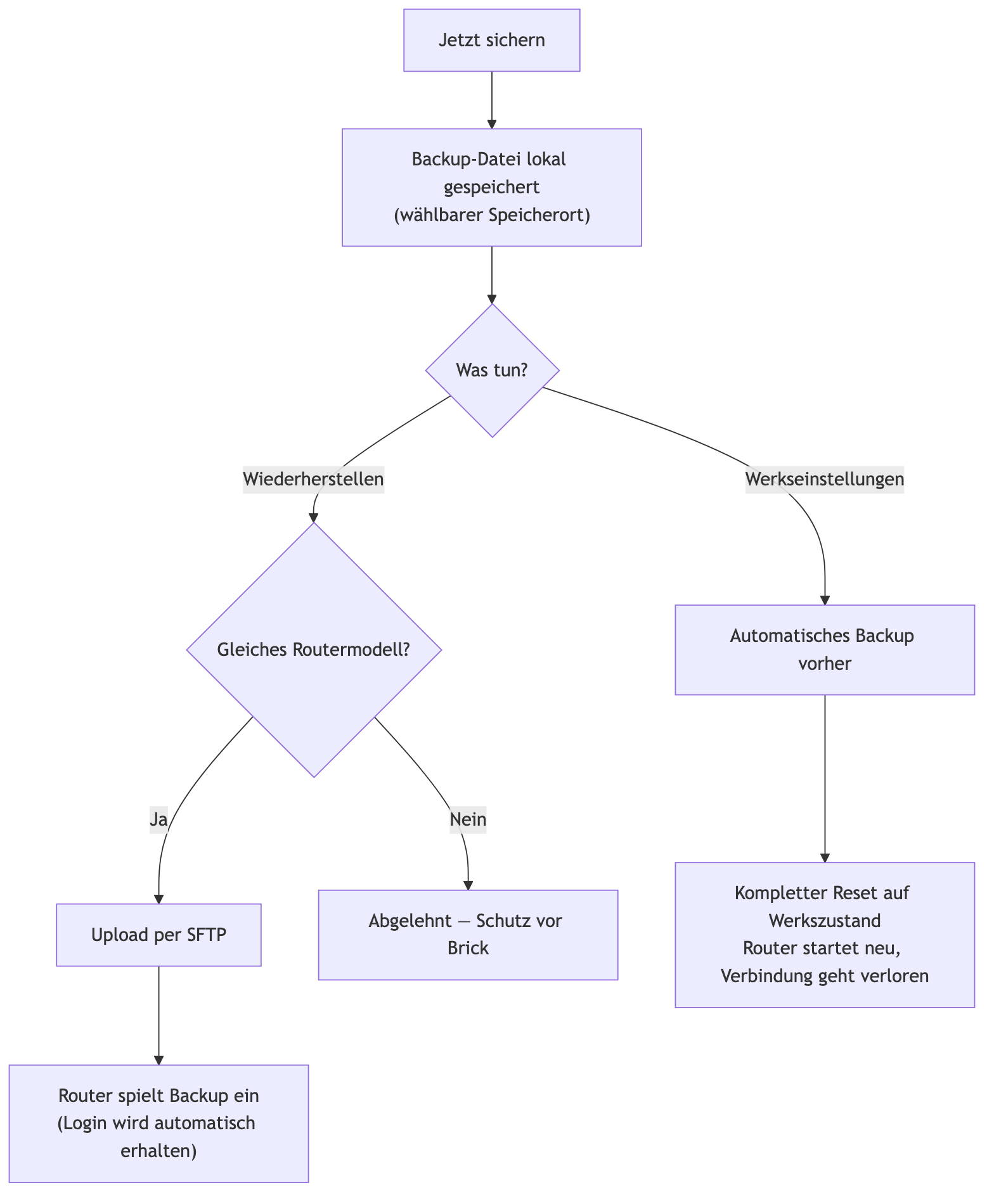
- **Back up now**: "Create a backup before making changes to the
router." Exports the current configuration.
- **Save location**: "Choose your own folder for new backups, e.g. on an
external drive or in iCloud Drive" / "Use default" — "Resets the save
location back to the app's own default folder."
- **Restore**: "Restore this backup onto the connected router — only for
the exact same router model." Uploads the backup via SFTP and restores
it; checks beforehand whether the backup matches the connected router
model (protection against "bricking" it with the wrong model), and
automatically preserves the current login (backups never contain
passwords).
- **Danger zone — restore factory defaults**: "Resets the router
completely to the manufacturer's default configuration — all previous
changes (internet, home network, VLANs, Wi-Fi, firewall) are lost. The
router reboots afterwards." Before the final reset: "This deletes ALL
previous settings … A backup is also created automatically
beforehand." Meant only as a last resort, if something went wrong.
---
## 7. Settings
Reachable via the app menu **RouterOS Assistant → Settings…** (or ⌘,) —
not a tab, but a native macOS Settings window with three tabs. Every
change takes effect immediately, no app restart needed.
**General**
- **Language**: DE/EN toggle — "Same as the 🇩🇪/🇬🇧 button in the
toolbar — both control the same setting."
- **Automatically check for updates when connecting** (default: off):
"Automatically checks after every successful connection whether a
newer RouterOS version is available — same as the 'Check for updates'
button in the Connect tab."
**Appearance**
- **Color theme**: Standard or High Contrast. "Applies to the diagram
colors in the Topology tab and the status colors in the LAN Scanner
(traffic active, static/dynamic, open/closed port)." Also colors the
categories in the Expert tab's sidebar (Firewall, Interfaces, IP
Addressing, Routing, VPN/Wi-Fi/Queues/System/Tools) with the same
palette.
- **Text size**: Small / Standard / Large / Extra Large. Applies to text
everywhere in the app — with two deliberate exceptions: the Topology
diagram's node cards and the LAN Scanner's table columns stay at a
fixed size, since they have fixed card widths and would otherwise
clip text.
- **Controls**: Compact / Standard / Comfortable — "Size of buttons,
fields, and spacing throughout the app."
**Network**
- **Refresh rate** (0.1 s / 0.5 s / 1 s / 3 s): how often the LAN
Scanner polls live traffic per port. "Higher refresh rates show the
traffic trend more finely, but cost more CPU when many ports are
active at once."
- **Sparkline time window** (10 s / 30 s / 60 s) and **sparkline width**
(100–300pt): length and width of the small traffic history graph next
to each port header in the LAN Scanner.
---